Top Videos
🇹🇭 วิดีโอตัวอย่างของระบบ HowToPayPOS รุ่น 1.5 ที่จะพาคุณไปรู้จักกับฟีเจอร์ใหม่และการใช้งานที่เพิ่มความสะดวกในการขายหน้าร้าน ไม่ว่าจะเป็นการชำระเงิน การพิมพ์ใบเสร็จ หรือการจัดการข้อมูลสินค้า ทุกขั้นตอนถูกออกแบบมาให้ใช้งานง่ายและรวดเร็ว
✨ หัวข้อในวิดีโอนี้:
- หน้าตาและการใช้งานอินเทอร์เฟซใหม่
- วิธีการรับชำระเงินผ่าน POS
- การตั้งค่าระบบและการจัดการสินค้า
- ฟีเจอร์ใหม่ในเวอร์ชัน 1.5
📌 เหมาะสำหรับ: ร้านค้า SMEs, ธุรกิจค้าปลีก และร้านอาหารที่ต้องการระบบ POS ที่ใช้งานง่ายและมีประสิทธิภาพ
📞 สนใจสอบถามข้อมูลเพิ่มเติม
Website: [a]www.howtopaypos.com[/a]
Facebook: HowToPayPOS
Email: [email protected]
🇬🇧 This is a demo video of HowToPayPOS version 1.5 showcasing the new features and improvements that make point-of-sale operations faster and easier. From processing payments, printing receipts, to managing product data — all key functions have been redesigned for ease of use.
✨ Topics covered in this video:
- New user-friendly interface
- Accepting payments via POS
- System settings & product management
- What’s new in version 1.5
📌 Ideal for: Small businesses, retail stores, and restaurants looking for an efficient and easy-to-use POS solution
📞 For more info:
Website: [a]www.howtopaypos.com[/a]
Facebook: HowToPayPOS
Email: [email protected]
🇹🇭 วิดีโอนี้เป็นวิดีโอแนะนำการใช้งานหน้าจอห้องครัว (Kitchen Screen) ของระบบ HowToPay POS แบบรวบรัด เข้าใจง่าย เหมาะสำหรับร้านอาหาร ร้านกาแฟ และร้านเครื่องดื่ม ที่ต้องการจัดคิวการทำอาหารให้รวดเร็ว ไม่สับสน
🍽 หัวข้อในวิดีโอนี้:
- การแสดงออเดอร์บนหน้าจอห้องครัวโดยอัตโนมัติ
- การจัดลำดับคิวอาหาร
- การแจ้งสถานะอาหาร: กำลังทำ / เสร็จแล้ว
- การแยกหน้าจอตามประเภทครัว (เช่น อาหาร / เครื่องดื่ม)
📌 ช่วยเพิ่มความแม่นยำในการจัดคิวอาหาร ลดการใช้กระดาษ ปรับปรุงการทำงานในครัวให้อย่างเป็นระบบ
👍 เหมาะสำหรับ: ร้านอาหาร ร้านกาแฟ ร้านเครื่องดื่มที่มีครัวหรือบาร์
📞 สนใจสอบถามเพิ่มเติม:
Website: [a]www.howtopay.com[/a]
Facebook: HowToPayPOS
Email: [email protected]
🇬🇧 This is a quick tutorial video on how to use the Kitchen Screen feature in HowToPay POS. Perfect for restaurants, cafés, and beverage shops that need an efficient kitchen workflow with accurate order tracking.
🍽 Topics covered in this video:
- Auto-display of incoming orders on the kitchen screen
- Managing food queue by time sequence
- Change order status: In progress / Completed
- Split kitchen screens by category (e.g., Food / Drinks)
📌 Improve kitchen operations, reduce paper use, and speed up service with real-time order updates.
👍 Ideal for: Restaurants, cafés, and drink shops with kitchen or bar stations.
📞 For more info:
Website: [a]www.howtopay.com[/a]
Facebook: HowToPayPOS
Email: [email protected]
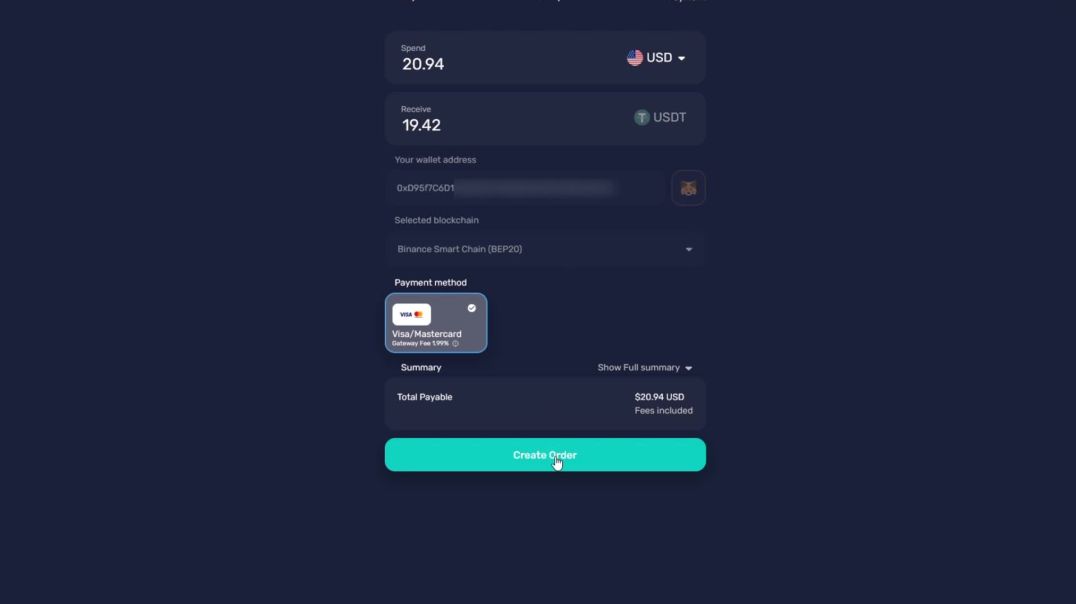
Discover just how simple online payments can be with HowToPay and BANXA.
✅ Complete your quick KYC once
✅ Select your country
✅ Choose from a list of secure local payment methods
Make fast, easy, and reliable payments—anytime. You’ll receive an email receipt instantly, and our support team is ready to help at [email protected].
💳 Local. Easy. Secure.
Experience stress-free payments today with HowToPay + BANXA!